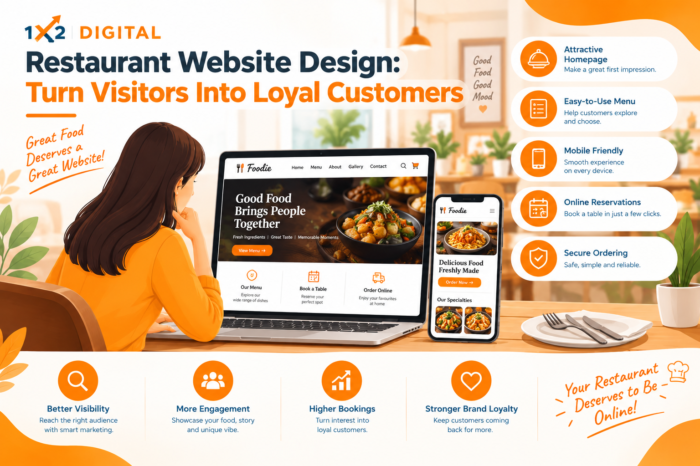
Restaurant Website Design: Turn Visitors Into Loyal Customers
- October 22, 2026
Introduction
A restaurant website is often the first place people visit before deciding where to eat. They want to explore the menu, check prices, view food photos, find the restaurant location, and understand how to book a table or place an order. If the website makes these tasks difficult, potential customers may choose another restaurant.
Effective Restaurant Website Design helps restaurant owners present their food, services, atmosphere, and brand clearly. It gives visitors the information they need and makes it easier for them to take the next step, whether that means visiting the restaurant, ordering food online, or making a reservation.
A successful restaurant website is more than an attractive collection of pages. It should work smoothly on mobile devices, load efficiently, display essential information, and make important actions easy to find. With the right design and development approach, restaurants can create a better online experience and encourage customers to return.
Why Restaurant Website Design Matters for Business Growth
Customers often compare multiple restaurants before choosing one. A well-organised website helps your business make a positive first impression and gives visitors practical reasons to choose you.
Here are some ways a good website supports restaurant growth.
Creates a Strong First Impression
Your website communicates your restaurant’s personality before customers walk through the door. Food photography, colours, typography, and page layout can help communicate whether your restaurant offers fine dining, casual meals, family dining, or quick service.
A consistent visual identity also makes your restaurant easier to recognise across your website and other marketing channels.
Makes Restaurant Information Easy to Find
Visitors should not have to search through several pages to find your menu, address, opening hours, or contact details. Important information should be visible and organised logically.
A clear website structure reduces confusion and helps potential customers make decisions with greater confidence.
Encourages Orders and Reservations
A restaurant website should guide visitors towards useful actions. Depending on your business model, these may include ordering food, booking a table, checking catering services, or contacting your team.
Clearly labelled buttons and a straightforward process can reduce unnecessary steps between discovering your restaurant and becoming a customer.
Supports Long-Term Customer Relationships
A website can also help you stay connected with existing customers. Updated menus, seasonal offers, event announcements, and information about loyalty programmes give people reasons to revisit.
When customers consistently find accurate information and enjoy a smooth online experience, they have a better reason to consider your restaurant again.
Essential Elements of an Effective Restaurant Website
A restaurant website should combine attractive design with practical features. The most useful elements depend on your restaurant type, audience, and services.
1. A Clear and Attractive Homepage
Your homepage should quickly explain what your restaurant offers and why visitors should explore it.
Strong Restaurant Homepage Design starts with a clear message, appealing food images, and easy navigation. Visitors should immediately understand the restaurant’s style and find the next step without unnecessary scrolling.
Consider including:
- A short introduction to your restaurant.
- High-quality images of signature dishes.
- A visible menu link.
- Clear buttons for reservations or online orders.
- Location and opening-hour information.
- Customer reviews or genuine testimonials, where appropriate.
Avoid placing too much information in the first section. A focused homepage helps visitors understand your offer before exploring additional details.
2. A Readable and Up-to-Date Menu
The menu is one of the most important sections of a restaurant website. Customers want to understand the available dishes, prices, portion options, and dietary information before ordering or visiting.
Organise dishes into logical categories such as starters, main courses, desserts, beverages, or meal combinations. Use readable text and keep descriptions informative without making them unnecessarily long.
If your restaurant offers vegetarian, vegan, or other dietary options, display that information clearly where relevant. Remember to update the website whenever prices, availability, or menu items change.
A mobile-friendly menu page is especially useful for customers browsing while travelling or deciding where to eat.
3. High-Quality Food Photography
Food images can help visitors understand what to expect from your restaurant. Use genuine, clear photographs that represent the dishes you actually serve.
Choose images that show food attractively without misleading customers about ingredients, portions, or presentation. Compress image files appropriately so they do not unnecessarily slow down the website.
Include meaningful alternative text for informative images to support accessibility and help search engines understand the content.
4. Mobile-Friendly Restaurant Web Design
Many customers browse restaurant websites on their phones. A website that works well on a desktop but becomes difficult to use on a small screen can create frustration.
Good Restaurant Web Design should adapt to different screen sizes and make essential actions easy to complete.
Check that:
- Text is readable without zooming.
- Buttons are easy to tap.
- Menus open and display correctly.
- Contact details are easy to access.
- Reservation and ordering forms work properly.
- Important information does not get hidden behind large images or pop-ups.
Test the website on different mobile devices and browsers before publishing changes.
5. Simple Navigation and Clear Calls to Action
Navigation should help visitors move between important pages without confusion. Use familiar labels such as Home, Menu, About Us, Reservations, Contact, and Order Online where those sections are available.
Calls to action should describe exactly what happens when a visitor clicks them. For example, “View Menu,” “Reserve a Table,” and “Order Online” are clearer than vague phrases such as “Click Here.”
Place these actions where visitors naturally need them. The goal is to make the customer journey straightforward rather than filling every section with competing buttons.
Restaurant Website Development: Features That Improve the Customer Experience
Design attracts attention, but the website’s functionality determines how easily visitors can use it. Careful Restaurant Website Development helps connect the visual experience with the tasks customers want to complete and improve the customer journey.
Online Ordering and Table Reservations
Restaurants that accept direct online orders can provide a convenient alternative to phone-based ordering. A suitable ordering system should display available items, prices, customisation options, and delivery or collection details clearly.
For dine-in restaurants, a reservation feature can help customers request a table without calling during busy hours.
Choose features that match your actual operations. If you do not offer delivery or table reservations, prioritise other functions that customers need instead.
Fast Loading and Reliable Performance
A website that takes too long to load may discourage visitors from exploring it. Large photographs, unnecessary scripts, and poorly configured features can affect performance.
To improve the experience, resize and compress images, avoid unnecessary plugins, use reliable hosting, and review page performance regularly. Test key functions after making updates to identify problems before customers encounter them.
Secure Forms and Contact Information
If your website collects customer details through reservation forms, contact forms, or online orders, make the process clear and use appropriate security measures.
Display accurate phone numbers, addresses, opening hours, and relevant policies. A working map or directions link can also help customers find the restaurant more easily.
Accessible and Easy-to-Read Content
Use sufficient text contrast, clear headings, descriptive links, and forms with understandable labels. These improvements make the website easier to use for people with different needs and browsing preferences.
Accessibility should be considered throughout the design process, not added as an afterthought.
How to Choose the Right Restaurant Website Builder
A Restaurant Website Builder can help owners create and manage a website without building every component from scratch. However, not every platform will suit every restaurant.
Before choosing a builder, consider these factors:
- Ease of editing: Can your team update menus, prices, photos, and opening hours without technical difficulty?
- Mobile responsiveness: Does the website work well on phones and tablets?
- Ordering and booking support: Can the platform support the features your restaurant needs?
- Search engine optimisation: Can you edit page titles, meta descriptions, URLs, and image alternative text?
- Performance and security: Does the platform support reliable loading and appropriate security measures?
- Room to grow: Can you add new pages, locations, services, or marketing integrations later?
- Total cost: Consider subscription fees, hosting, add-ons, maintenance, and transaction charges where applicable.
A website builder may be suitable for a small restaurant with straightforward requirements. A restaurant with multiple locations, specialised ordering needs, or more complex integrations may require a customised solution from a professional development company.
Choose based on your actual business needs rather than selecting a platform only because it is popular.
How Restaurant Website Design Supports SEO
Search engine optimization helps search engines understand your website and helps potential customers discover relevant pages. Good design supports SEO by making content accessible, navigation logical, and pages easier to use.
Create Useful, Location-Relevant Pages
Include your restaurant’s name, address, contact details, cuisine type, and service area where appropriate. If you operate in a particular city or neighbourhood, provide accurate location information instead of repeating location keywords unnaturally.
Each important page should have a clear purpose and a descriptive title. For example, a dedicated menu page should focus on helping visitors understand the dishes and prices rather than repeating general promotional text.
Keep Important Information Consistent
Check that your website details match your restaurant’s other online business listings. Inconsistent addresses, telephone numbers, or opening hours can confuse potential customers.
If your restaurant has multiple branches, provide accurate information for each location.
Improve Technical and On-Page SEO
Use descriptive page titles, relevant headings, clear URLs, and useful image alternative text as part of technical and on-page SEO. Make sure search engines can access important pages and that your mobile website functions correctly.
Where appropriate, structured data can help search engines interpret details about your restaurant. However, adding structured data does not guarantee enhanced search results.
SEO is an ongoing process. Review website performance and customer behaviour to identify areas that need improvement.
Common Restaurant Website Design Mistakes to Avoid
Even an attractive website can lose potential customers if it makes simple tasks difficult.
Hiding the menu: Make the menu easy to find from the homepage and main navigation.
Using outdated information: Update prices, opening hours, seasonal menus, and holiday schedules when they change.
Overloading the homepage: Too many banners, animations, pop-ups, and competing messages can distract visitors from important actions.
Ignoring mobile users: Test menus, forms, buttons, and ordering processes on smaller screens.
Using misleading photographs: Images should accurately represent the food and experience customers can expect.
Making contact difficult: Display reliable contact details and directions in an accessible location.
Forgetting maintenance: Regularly check forms, links, software updates, website performance, and security settings.
Addressing these issues can make the website more useful without requiring a complete redesign.
When to Work With a Restaurant Website Development Company
Some restaurants can manage a basic website with a builder, while others need professional support to meet more complex requirements.
A Restaurant Website Development Company may help with custom layouts, online ordering integrations, reservation systems, mobile optimisation, technical SEO, and ongoing maintenance.
Before hiring a provider, review its relevant portfolio, understand the project scope, ask who will manage future updates, and clarify the costs of development and maintenance. Make sure you retain appropriate access to your domain, hosting, website platform, and business data.
For restaurants looking to improve their wider digital presence, a digital marketing agency in Rajkot may help coordinate website improvements with relevant SEO, paid advertising, and conversion optimization activities.
Restaurants in Ahmedabad can also explore the best digital marketing agency in Ahmedabad when looking for support with their website and broader digital marketing strategy.
The right partner should understand your restaurant’s goals and recommend features that support those goals, rather than adding unnecessary complexity.
Conclusion
Effective Restaurant Website Design brings together clear information, appealing food photography, mobile-friendly layouts, useful functionality, and a straightforward customer journey. It helps visitors explore your restaurant, understand your menu, and take the next step with less effort.
Start with the essentials: an informative homepage, an up-to-date menu, accurate contact details, and clear ordering or reservation options where relevant. Then improve performance, usability, and SEO based on real customer needs.
A restaurant website should do more than look attractive. It should make choosing, visiting, and returning to your restaurant a convenient experience.
FAQs
1. How to design a website for a restaurant?
Start by planning your website pages, including Home, Menu, About Us, and Contact. Choose a clean layout, add quality food photos, and make important information easy to find. Ensure the website works well on mobile devices and includes clear options for ordering or reservations.
2. What is the best website design for a restaurant?
The best restaurant website design is attractive, simple, and user-friendly. It should feature a clear menu with prices, appealing food images, opening hours, location details, and easy-to-find contact information. A fast-loading, mobile-friendly layout helps visitors browse without difficulty.
3. How do I build a website for my restaurant?
Choose a suitable website builder or hire a professional development company. Create essential pages, add your menu and restaurant details, and include online ordering or reservation features if needed. Before publishing, check mobile usability, page speed, contact forms, and basic SEO settings.
4. What are some good ideas for a restaurant website?
Include an attractive homepage, high-quality food photos, an easy-to-read menu, customer reviews, and a map showing your location. You can also feature chef recommendations, seasonal dishes, special offers, and clear buttons for online orders or table reservations.
5. Can you provide some examples of restaurant websites?
Restaurant website examples can include fine-dining restaurants, cafés, fast-food outlets, and family restaurants. When reviewing examples, look at how they organise menus, display food photography, highlight their unique offerings, and guide visitors towards reservations or online orders. These elements can help you identify ideas that fit your restaurant’s audience and business goals.
More from our blog
See all posts