Fashion Ecommerce: Turning Online Browsers Into Confident Buyers
- October 1, 2026
Introduction
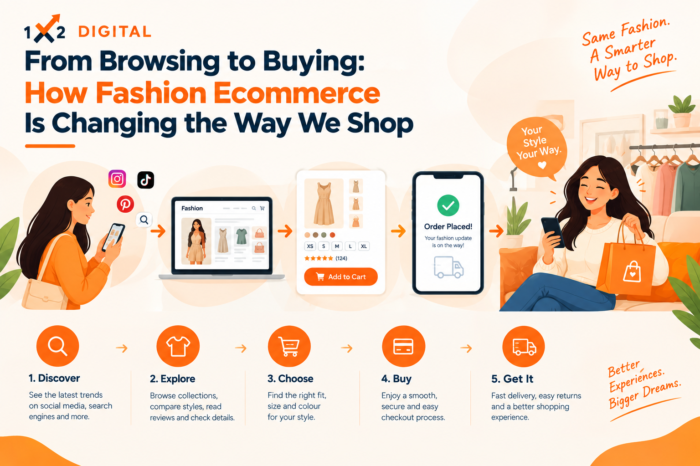
Buying clothes online should feel easy. Shoppers want to find styles they like, understand how they will fit, and know what to expect before placing an order. When a website makes these steps difficult, customers may leave without buying.
For fashion brands, Fashion Ecommerce is about more than putting products online. It means creating a shopping experience that helps people discover products, make informed choices, and feel confident about their purchase.
This guide explores practical ways to improve product discovery, present clothing clearly, build customer trust, and make online shopping easier.
Help Shoppers Find the Styles They Want
Customers may arrive at your store with a specific product in mind—or simply looking for inspiration. Your website should support both types of shoppers.
Organise products into clear categories and collections. Use helpful filters for size, colour, price, material, and style so customers can narrow down their choices without frustration.
A well-structured Fashion Ecommerce Website should also have descriptive product and category names. For example, “Women’s Linen Trousers” tells shoppers more than a vague title such as “Summer Essential.”
Make sure important products are easy to reach from relevant category pages. The fewer unnecessary steps shoppers need to take, the easier it becomes to explore your catalogue.
Give Every Product Page the Details Customers Need
Clothing shoppers cannot touch fabric or try on garments before ordering. Your product pages need to answer the questions they would normally ask in a store.
Include:
- Clear photographs from useful angles
- Fabric composition and care instructions
- Available colours and sizes
- Fit details and garment measurements
- Current price and stock status
- Delivery, return, and exchange information
- Genuine customer reviews, when available
Avoid vague descriptions such as “high-quality material” without supporting details. Explain what the garment is made from and how it fits.
A useful product page helps shoppers understand the item before they add it to their cart.
Make Size and Fit Easier to Understand
Uncertainty about sizing can stop customers from buying—and may lead to avoidable returns.
For an Apparel Ecommerce Website, provide garment-specific size charts with actual measurements wherever possible. Explain whether an item has a slim, regular, relaxed, or oversized fit.
For example, a trousers page could include waist, hip, and inseam measurements. A shirt page could show chest, shoulder, and sleeve measurements.
If accurate information is available, include the model’s height and the size worn. Explain how customers should take their own measurements so they can compare them with the chart.
Use Product Images That Show the Real Item
Good fashion photography helps customers understand colour, shape, texture, and fit.
Consider including:
- Front and back views
- Close-ups of fabric and stitching
- Images showing how the garment looks when worn
- Short videos demonstrating movement or drape, where useful
Keep images accurate. Editing should not misrepresent the product’s colour or appearance.
Large image files can also slow down shopping pages. Use appropriately sized images and modern formats where supported, while maintaining enough quality for customers to inspect the product.
Create a Navigation Structure That Makes Sense
A large catalogue can become difficult to browse when categories are unclear or filters do not work properly.
Organise Fashion Shopping Websites around the products and shopping habits of your audience. Depending on your inventory, categories might include clothing type, audience, occasion, or season.
Useful filters may include:
- Size and colour
- Price range
- Material
- Style
- Product availability
Avoid adding categories just to make the menu look extensive. A simple, logical structure is usually more helpful than a complicated one.
Make Mobile Shopping Comfortable
Many shoppers discover fashion products on their phones. Your Clothing Ecommerce Website should make browsing and purchasing comfortable on smaller screens.
Check that customers can easily:
- Read product details without excessive zooming.
- Select sizes and colours.
- Open the size guide.
- Find delivery and return information.
- Add products to the cart.
- Complete checkout without confusing steps.
Test the store on real mobile devices. Pay attention to page speed, navigation, buttons, form fields, and error messages.
A mobile-friendly store needs both good performance and a clear user experience. A fast page is not enough if shoppers cannot find the size selector or understand the delivery terms.
Use SEO to Bring Relevant Shoppers to Your Store
Search engine optimization helps customers discover products when they search for styles, clothing types, or specific items.
For Fashion Ecommerce SEO, focus on making product and category pages useful and easy for search engines to understand.
Write descriptive product and category titles
Use accurate product names and relevant attributes, such as material, fit, or colour, when they help distinguish an item. Avoid repeating keywords unnaturally.
Make category pages useful
Explain what shoppers can find in each collection. Keep the information relevant instead of adding repetitive text simply to include keywords.
Review filtered URLs and duplicate pages
Some filters create multiple URLs for similar product combinations. Review how your website manages these pages, including canonical tags, internal links, and indexing rules. Some filtered pages may deserve to be searchable if they meet a genuine customer need.
Handle unavailable products appropriately
Temporarily unavailable products may remain useful if the page shows accurate stock information and relevant alternatives. For discontinued products, decide whether to keep the page, redirect it to a genuinely equivalent item, or return a not-found response.
Avoid redirecting every discontinued product to the homepage.
Build Trust With Clear Policies and Accurate Information
Online shoppers may have concerns about fit, quality, delivery, payment, or returns. Make these details easy to find before checkout.
Useful trust signals include:
- Accurate product details and photographs
- Genuine reviews
- Clear shipping costs and delivery estimates
- Understandable return and exchange policies
- Transparent pricing
- Accessible customer support information
- Secure payment options
For customers in India, clearly explain the payment methods your store supports. If cash on delivery is available, communicate any conditions. Only promise delivery times your business can reasonably meet.
Make Checkout Simple and Predictable
Customers may abandon their carts when checkout feels complicated or unexpected costs appear.
Review your checkout for:
- Unexpected shipping charges
- Unnecessary form fields
- Confusing payment steps
- Forced account creation
- Unclear error messages
- Difficult mobile interactions
Show the total cost clearly before payment and help customers correct mistakes. Where appropriate, offer guest checkout and familiar payment methods.
These improvements are part of conversion rate optimization: identifying and reducing the barriers that prevent interested shoppers from completing an order.
Learn From Customer Behaviour
Website data can help you identify where shoppers struggle. Review product views, searches, filter use, add-to-cart actions, checkout starts, and completed purchases.
Ask questions such as:
- Do shoppers view products but rarely add them to the cart?
- Are customers leaving after checking sizes?
- Do checkout problems occur on particular devices?
- Which categories attract visits but few purchases?
Use these patterns to guide further investigation. Low sales may be caused by unclear product information, pricing, unavailable sizes, or mismatched traffic—not necessarily one website feature.
Relevant product recommendations can also help shoppers discover matching items or accessories. Keep recommendations useful and respect customer privacy choices.
Measure More Than Website Traffic
Traffic is only one part of ecommerce performance. Track metrics that show whether visitors are finding products and completing purchases.
Useful measures include:
- Organic search clicks and impressions
- Product and category page engagement
- Add-to-cart rate
- Checkout completion rate
- Average order value
- Returns and exchange reasons
- Revenue by traffic source, when tracking is reliable
Compare similar periods and account for stock, pricing, promotions, and seasonal changes. Use the data to identify problems and test improvements rather than making changes without a clear reason.
Connect Marketing With the Store Experience
Your marketing message should match the page customers reach after clicking.
SEO can help shoppers discover products through search. Social media can introduce new styles, while paid campaigns can promote selected products or collections. Email marketing can share relevant updates with customers who have opted in.
Businesses looking to improve organic visibility can explore eCommerce SEO services. For a better understanding of customer behaviour, eCommerce Analytics may also be useful.
Brands seeking wider digital marketing support can consider a digital marketing agency in Rajkot or a digital marketing agency in Ahmedabad, based on their business needs.
A Simple Fashion Ecommerce Improvement Checklist
Before investing in more traffic or new features, review these essentials:
- Product information: Are fabric, fit, measurements, price, and stock details accurate?
- Navigation: Can shoppers find products using clear categories and useful filters?
- Mobile experience: Can customers browse and buy comfortably on their phones?
- Trust: Are delivery, payment, and return policies easy to understand?
- SEO: Are important product and category pages accessible and descriptive?
- Checkout: Are costs clear and payment steps easy to complete?
- Measurement: Can you identify where shoppers leave the buying journey?
Start with the issues that directly affect customers. Fixing an unclear size guide or a broken checkout may be more valuable than adding a feature that does not solve a real problem.
Final Thoughts
A successful fashion store helps customers move from discovering a style to choosing the right product and completing their purchase with confidence.
Clear product information, helpful sizing, realistic photography, simple navigation, mobile usability, and a reliable checkout all contribute to a better shopping experience.
For fashion businesses, the best improvements often begin with one question: What is making it difficult for customers to buy? Identify that barrier, fix it, and measure whether the change helps.
FAQs
1. What Is Fashion Ecommerce?
Fashion ecommerce is the buying and selling of clothing, footwear, and accessories through online stores or digital marketplaces.
2. What Makes a Fashion Ecommerce Website Successful?
Clear product details, accurate images, useful size guides, easy navigation, and a simple checkout help customers shop confidently.
3. How Does SEO Help Fashion Ecommerce Websites?
SEO helps search engines understand product and category pages, making it easier for shoppers to find relevant fashion products through organic search.
4. How Can Fashion Ecommerce Websites Reduce Shopping Difficulties?
They can provide accurate size charts, clear product images, transparent delivery and return policies, and an easy checkout process.
5. How Can Fashion Brands Improve Their Online Shopping Experience?
Fashion brands can improve product information, test mobile usability, simplify navigation, and use customer feedback to identify shopping problems.
More from our blog
See all posts